
QR Code Scams in India: How Cybercriminals Are Stealing Money Without Hacking Your Phone
Introduction: A New-Age Scam Targeting Smart Users
India has become one of the world’s largest digital payment ecosystems. From small tea stalls to large malls, QR codes are everywhere. While this convenience has transformed how we pay, it has also opened the door to a new and highly dangerous cyber fraud – QR Code Scams.
What makes QR code scams especially dangerous is that no hacking, no OTP theft, and no malware installation is required. Victims willingly authorize payments, believing they are receiving money, discounts, or refunds.
At TriosCyber, we have observed a sharp rise in such cases across India—affecting students, shopkeepers, salaried professionals, and even tech-aware users.
This blog explains how QR code scams work, real-life attack scenarios, why even smart users fall for them, and how you can stay protected.
What Is a QR Code Scam?
A QR code scam is a cyber fraud technique where attackers trick users into scanning a malicious or misleading QR code, resulting in unauthorized money transfer, data exposure, or account compromise.
Unlike traditional cyber attacks, QR scams rely on social engineering, not technical hacking.
Why QR Code Scams Are Growing Rapidly in India
Several factors make India a prime target:
- Massive adoption of UPI-based payments
- Limited awareness of “scan-to-pay” vs “scan-to-receive”
- Over-trust in digital apps
- Low cyber literacy among first-time digital users
Cybercriminals exploit confusion, not technology.
Common Types of QR Code Scams in India
1. “Scan to Receive Money” Scam
This is the most common and successful QR scam.
The scammer contacts the victim claiming:
- Refund from OLX/Quikr sale
- Advance payment for a product
- Salary or incentive transfer
- Cashback or prize amount
The victim is told:
“Sir, just scan this QR code to receive money.”
Reality:
Scanning a QR code initiates a payment request, not a credit.
Once the victim enters UPI PIN, money is debited instantly.
2. Fake Customer Support QR Codes
Fraudsters pose as support agents from platforms like Google Pay or PhonePe.
They send a QR code claiming:
- Account verification
- Refund processing
- Transaction reversal
Scanning leads to instant fund transfer.
3. QR Stickers on Shops & Parking Areas
Attackers paste fake QR stickers over genuine ones at:
- Parking meters
- Small shops
- Petrol pumps
- Public charging stations
Users unknowingly pay scammers instead of merchants.
4. WhatsApp QR Scams
Scammers send QR codes via WhatsApp claiming:
- Job registration
- Free course access
- Government scheme benefits
- Electricity bill discount
Once scanned, victims lose money or personal data.
How QR Code Scams Actually Work (Technical Reality)
QR codes themselves are not malicious. The danger lies in:
- Payment authorization confusion
- Fake intent masking
- Human trust exploitation
A QR code can:
- Trigger a UPI payment request
- Open a phishing website
- Download malicious apps
- Capture device metadata
No antivirus can fully stop this—awareness is the real defense.
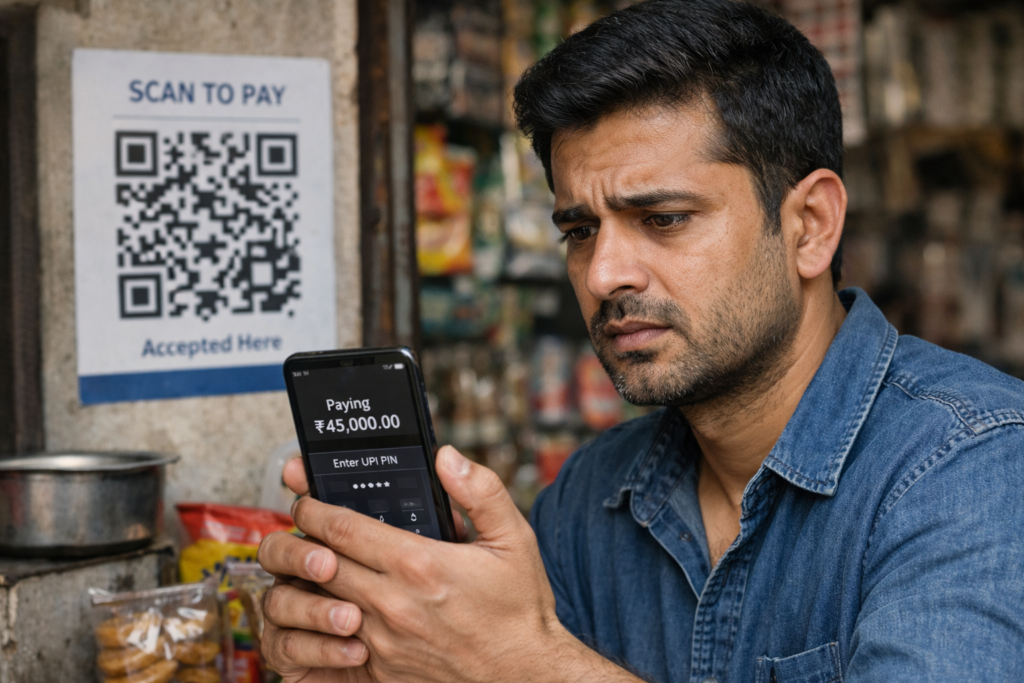
Real-Life Example: How a ₹45,000 Loss Happened in 30 Seconds
A small business owner listed a product online.
A “buyer” contacted him and sent a QR code for advance payment.
The victim scanned the code, entered UPI PIN believing he was receiving money.
Within seconds:
- ₹45,000 debited
- Number blocked
- Bank helpless
No hacking. No OTP theft. Just misinformation.
Why Educated & Tech-Savvy Users Also Fall for QR Scams
- Overconfidence in digital apps
- Habitual scanning without reading prompts
- Psychological pressure (“limited offer”, “urgent”)
- Blind trust in caller identity
Cybercriminals study human behavior, not devices.
How to Identify a QR Code Scam Immediately
Always remember:
- You never scan a QR code to receive money
- No bank or UPI app asks for QR scanning
- Customer support never sends QR codes
- Refunds never require QR scanning
If someone insists → It’s a scam
Best Practices to Stay Safe from QR Code Scams
1. Read the Payment Screen Carefully
Always check:
- “Paying to” name
- Amount
- App warning messages
2. Disable Auto-Scan Features
Avoid apps that auto-open scanned links.
3. Educate Family Members
Especially:
- Parents
- Elderly users
- First-time smartphone users
4. Verify Before You Scan
Ask:
- Why do I need to scan?
- Who is sending this?
- Is payment being requested?
What To Do If You’ve Been Scammed
If money is lost:
- Call your bank immediately
- Report on 1930 cybercrime helpline
- File complaint on cybercrime portal
- Preserve screenshots and transaction IDs
Quick action increases recovery chances.
Why QR Code Scams Will Increase in the Future
- Rapid digitization
- AI-powered scam scripts
- Deepfake voice calls + QR fraud
- Growing UPI user base
Without awareness, losses will multiply.
How TriosCyber Is Helping Fight QR Code Frauds
At TriosCyber, we actively conduct:
- Cyber awareness workshops
- Corporate security training
- Parent & senior citizen cyber safety programs
- Student-focused digital fraud education
We believe prevention through education is the strongest cybersecurity tool.
Final Thoughts: Convenience Should Never Replace Caution
QR codes are powerful tools – but blind trust can be expensive.
Cybercriminals don’t break systems; they break human judgment.
Stay alert. Stay informed. Stay cyber-safe.
Yes. Scanning a QR code can trigger a payment request or redirect you to a fraudulent page. If you approve the request or enter your UPI or banking PIN, money can be debited instantly.
Fake QR codes often come with urgent messages, refund claims, prize offers, or customer support impersonation. Any QR code asking for verification, refunds, or account updates should be treated as suspicious.
Always read payment screens carefully, never scan QR codes to receive money, avoid QR codes from unknown sources, and educate family members about common QR scam tactics.
Immediately contact your bank or payment app, report the fraud through official cybercrime channels, and preserve transaction details and screenshots for investigation.