
How to Hack WhatsApp? How WhatsApp Accounts Get Hacked, Common Scams & How to Recover a Compromised WhatsApp Account

How to Hack WhatsApp? Understanding WhatsApp Account Takeovers
WhatsApp has become one of the world’s most widely used communication platforms. People use it for personal conversations, business communication, financial discussions, customer support, file sharing and even workplace operations.
Because of this, WhatsApp accounts have become valuable targets for cybercriminals.
When people search for “how to hack WhatsApp”, they may actually mean several different things:
- How do hackers get access to WhatsApp accounts?
- Can someone hack WhatsApp with an OTP?
- Can WhatsApp be hacked through a QR code?
- Can call forwarding compromise WhatsApp?
- What happens after a SIM swap?
- Can malware compromise WhatsApp Web?
- How can I recover a hacked WhatsApp account?
- How can I know whether someone has accessed my WhatsApp?

The reality is that most WhatsApp account takeovers do not involve someone magically “breaking WhatsApp encryption.”
Instead, attackers generally target the user, phone number, authentication process, linked devices, or device itself.
In 2026, this has become even more sophisticated. Recent advisories from India’s Indian Cybercrime Coordination Centre (I4C) describe WhatsApp account-takeover campaigns involving malicious files, fake regulatory communications and compromised WhatsApp Web sessions.
This guide explains how these attacks work at a defensive level and, more importantly, what you should do if your WhatsApp account has already been compromised.
Can WhatsApp Actually Be Hacked?
Yes – but the phrase “WhatsApp hacked” can describe several very different situations.
An attacker may obtain access by compromising:
- Your WhatsApp registration process
- Your mobile number
- Your SIM card
- Your phone calls through call-forwarding abuse
- Your WhatsApp linked devices
- Your computer running WhatsApp Web
- Your email or recovery account
- Your phone through malware
- Your account through social engineering
- Your own actions, such as sharing a verification code
This distinction is important.
A WhatsApp account takeover often happens because an attacker tricks the legitimate account owner into approving something, rather than directly defeating WhatsApp’s security mechanisms.
WhatsApp itself states that the six-digit registration code is used to verify ownership of a phone number and warns users never to share the code or password with anyone.
How Hackers Get Access to WhatsApp Accounts
There isn’t one universal WhatsApp hacking method.
Attackers continuously change their techniques depending on the victim, device, country and objective.
Here are some of the major methods currently seen in WhatsApp-related scams.
1. WhatsApp OTP / Verification Code Scam
This is one of the simplest account-takeover techniques.
An attacker attempts to register your phone number on another device.
WhatsApp sends a six-digit verification code to your phone.
The attacker then tries to convince you to give them that code.
For example, the attacker might pretend to be:
- A friend
- Customer support
- A delivery company
- A bank representative
- A recruiter
- A colleague
- A family member
- A WhatsApp representative
The attacker may say:
“I accidentally sent the verification code to your number. Please send it to me.”
The message may sound convincing, particularly if the attacker has already obtained information about you.
What happens?
If the attacker successfully obtains the registration code and completes registration, your WhatsApp account can be registered on their device.
WhatsApp explains that re-registering your number with the six-digit code logs other devices out of the account.
Important rule
Never share your WhatsApp verification code with anyone.
Not your friend.
Not your colleague.
Not customer support.
Not a “WhatsApp employee.”
2. WhatsApp Two-Step Verification PIN Scam
WhatsApp provides an additional authentication layer called two-step verification.
This is separate from the six-digit registration code.
Attackers may attempt to obtain both:
- Registration code
- Two-step verification PIN/password
Sometimes an attacker who has already gained access may enable two-step verification themselves.
This can make recovery more difficult.
According to WhatsApp’s current recovery guidance, if an attacker enabled two-step verification and the legitimate owner does not know the PIN, WhatsApp may require a seven-day waiting period before the PIN can be bypassed during recovery.
Security recommendation
After recovering your account:
WhatsApp → Settings → Account → Two-step verification
Enable it and add a recovery email where available.
3. WhatsApp QR Code / Linked Device Scam
One of the most important modern WhatsApp scams involves linked devices.
WhatsApp legitimately allows users to connect their account to:
- WhatsApp Web
- Desktop computers
- Other supported devices
The feature itself is legitimate.
The problem is that criminals can socially engineer victims into linking an attacker’s device.
For example, a scammer might send:
“Vote for my friend.”
or:
“Scan this QR code to verify your account.”
or:
“Scan this QR code to activate your WhatsApp business account.”
The victim believes they are completing a harmless action.
Instead, they may unknowingly authorize a new linked device.
I4C has specifically warned about WhatsApp Web account-renting scams where victims are persuaded to connect their WhatsApp accounts through QR codes.
Recent security research has also documented “vote for my friend” campaigns that abuse legitimate WhatsApp linked-device functionality.
How to protect yourself
Only scan a WhatsApp Web QR code when you personally initiated the WhatsApp Web login.
Never scan a QR code because an unknown person tells you to.
4. WhatsApp Call Forwarding Scam
This is particularly important for Indian users.
In a call-forwarding scam, criminals convince victims to activate call forwarding on their mobile number.
The victim may receive a phone call from someone pretending to be:
- Telecom support
- Delivery personnel
- Customer care
- KYC department
- Internet provider
- Network technician
The attacker may ask the victim to dial a special service code.
If call forwarding is successfully activated, incoming calls can potentially be redirected to another number.
This can become dangerous when services use voice calls as an authentication channel.
Jio has publicly warned Indian users about call-forwarding scams in which criminals persuade victims to dial codes that forward incoming calls to another number.
Example attack chain
Social engineering
↓
Victim activates call forwarding
↓
Attacker attempts account verification using a voice call
↓
Verification call is redirected
↓
Attacker receives the verification information
↓
Account takeover may occur
The exact service codes and behavior can vary by telecom operator and service, so users should not follow codes supplied by unsolicited callers.
🚨 If You Suspect Call Forwarding Was Activated
If someone has convinced you to dial a call-forwarding code, do not panic. First, stop following instructions from the caller and verify your mobile-network settings.
Step 1: Cancel call forwarding
On many Indian GSM networks, you can try:
##002#

Then press the Call button.
This is commonly used to cancel active call-divert/forwarding settings. Airtel and Vi both document ##002# for cancelling call forwarding/diverts. However, telecom operators and plans can differ, so confirm the result with your operator if the code fails.
Step 2: Check whether unconditional call forwarding is active
On supported networks:
*#21#Then press Call.
This can display the status of unconditional call forwarding. Vi and Airtel document *#21# as a status-check code.
You may also check the other common forwarding conditions:
*#61#   → Call forwarding when unanswered
*#62#   → Call forwarding when unreachable
*#67#   → Call forwarding when busy
The availability and behavior of these codes can vary by carrier. Vi documents these status codes for its network.
Step 3: Check your phone settings
You can also check manually:
Android:Phone → Settings → Calling accounts/SIM → Call forwarding
iPhone:Settings → Phone → Call Forwarding
The exact menu can vary depending on the phone model and software version.
Step 4: Contact your telecom operator
If you did not activate forwarding yourself, contact your telecom provider using its official app, website or customer-care number and ask them to verify:
- Call forwarding/diversion
- SIM replacement activity
- Recent changes to your mobile account
- Unusual network activity
⚠️ Important
Do not dial a code given to you by an unknown caller.
Scammers may claim that a code will:
- Fix your network
- Complete KYC
- Locate a delivery
- Activate 5G
- Remove a virus
- Verify your SIM
Indian telecom guidance specifically warns about scams where victims are persuaded to dial codes that redirect incoming calls to an attacker’s number.
5. SIM Swap Attack
A SIM swap occurs when criminals fraudulently convince or manipulate a mobile operator into issuing a replacement SIM associated with the victim’s phone number.
I4C describes SIM swap as a situation where fraudsters obtain a new SIM for the victim’s registered number and can then receive OTPs and alerts associated with that number.
Warning signs
Your phone suddenly shows:
- No network
- Emergency calls only
- SIM inactive
- Unexpected loss of SMS
- Unexpected loss of incoming calls
while the service provider has not reported an outage.
This should be treated seriously.
How to Respond to a Suspected SIM Swap
If your phone suddenly loses mobile service and you did not intentionally change your SIM:
Do not wait.
Immediately:
- Contact your telecom operator through an official channel.
- Ask whether a replacement SIM/eSIM was recently issued.
- Ask whether there were recent changes to your mobile account.
- Restore control of your original number.
- Once your number is restored, re-register WhatsApp.
- Change passwords for important accounts.
- Review banking and payment applications for suspicious activity.
- Check WhatsApp linked devices.
- Enable two-step verification.
- Report suspected cybercrime if appropriate.
Remember that WhatsApp is tied to your registered phone number, and replacing a physical SIM does not itself automatically change the WhatsApp account
6. Malware and WhatsApp Web Account Takeover
This is one of the more advanced threats.
In 2026, I4C warned Indian businesses and finance professionals about a campaign involving malicious files disguised as legitimate financial or regulatory documents.
Examples included files presented as:
- “Statement of Account”
- “RBI”
- “MCA”
- Income Tax-related documents
According to the I4C advisory, some malicious Windows files could compromise a computer and hijack an active WhatsApp Web session.
The compromised account could then be used to distribute the same malicious file to contacts and groups.
This creates a self-propagating attack chain:
Victim receives malicious file
↓
Victim opens file
↓
Computer becomes compromised
↓
WhatsApp Web session is compromised
↓
Attacker gains access
↓
Malicious file is sent to contacts
↓
More victims open the file
This is especially dangerous for companies.
What to Do If You Opened a Suspicious APK, EXE or ZIP
If you accidentally installed or opened a suspicious file:
Do not immediately delete everything.
First, if possible, preserve evidence such as:
- Original file
- Sender’s WhatsApp number
- Message
- URL
- Screenshot
- File name
- Date and time
- Device used
- Any suspicious pop-ups
For a business or serious incident, professional forensic preservation may be important.
Then:
- Disconnect the affected device from the internet if appropriate.
- Do not open the suspicious file again.
- Do not enter passwords on the potentially compromised device.
- Use a known-clean device to change important passwords.
- Review WhatsApp linked devices.
- Review installed applications and permissions.
- Update the operating system and security software.
- Consider professional malware/incident-response analysis if compromise is suspected.
This is particularly relevant because malicious files can be used to compromise endpoints and potentially abuse active WhatsApp Web sessions.
7. Fake WhatsApp Customer Support Scam
Another common technique involves impersonating customer support.
An attacker may contact a victim and claim:
“Your WhatsApp account has a security problem.”
or:
“Your account will be blocked.”
or:
“We detected suspicious activity.”
They then ask for:
- OTP
- Verification code
- Two-step verification PIN
- QR-code scan
- Screen sharing
- Remote-access application
- Payment
These requests should immediately raise suspicion.
Never provide your WhatsApp verification code to an unsolicited caller.
8. Fake Job / Investment / Earning Scams
Attackers frequently use attractive financial opportunities to gain access to accounts.
Examples include:
- Work-from-home jobs
- Investment schemes
- Crypto opportunities
- Affiliate programs
- “Earn ₹5,000 per day”
- Fake commission platforms
- WhatsApp account rental
I4C has documented a WhatsApp Web account-renting scam where users were promised earnings for linking their WhatsApp accounts through QR codes. The resulting accounts could then be abused as “mule” accounts for further criminal activity.
Red flag
If someone says:
“Just connect your WhatsApp and earn money automatically.”
stop and verify the service independently.
9. “Vote for Me” WhatsApp Scam
This is another example of modern social engineering.
A compromised account—or an account pretending to belong to someone you know—may send:
“Can you vote for my friend?”
The message may contain a link.
The link may eventually lead the victim toward a fake WhatsApp-related verification or device-linking process.
Security researchers documented this technique in 2026, noting that the attacker could use the legitimate linked-device functionality to obtain account access.
Remember:
A message coming from a known contact does not automatically mean it is safe.
Their account may already be compromised.
10. Phishing Websites
Another common technique is phishing.
A phishing page may look like:
- WhatsApp Web
- WhatsApp Support
- Microsoft
- Meta
- Banking website
- Government portal
The goal is to make the victim enter information or perform an action that benefits the attacker.
Common warning signs
Look for:
- Strange domains
- Misspelled URLs
- Urgent threats
- Fake verification messages
- Unnecessary login requests
- Requests for OTPs
- Requests to install applications
Before entering credentials or scanning a QR code, verify that you are using the legitimate service.
11. Malicious APK Files
Android users should be particularly careful with APK files downloaded outside trusted app stores.
Attackers may distribute APKs disguised as:
- Jobs
- Government applications
- Banking updates
- Delivery applications
- Investment applications
- WhatsApp updates
- Security applications
- Earning platforms
Installing malicious applications can expose:
- SMS
- Notifications
- Contacts
- Files
- Accessibility permissions
- Device information
and potentially other sensitive data.
Do not install an APK simply because someone sends it to you on WhatsApp.
12. WhatsApp Business Account Attacks
Businesses can face additional risks because WhatsApp accounts may be connected to:
- Customers
- Vendors
- Employees
- Payment discussions
- Internal documents
- Business groups
- Management teams
A compromised business account can therefore become a social-engineering platform.
For example, criminals may impersonate a company executive and request an urgent payment.
I4C’s 2026 warning about the “Boss Scam” describes compromised WhatsApp accounts being used to impersonate senior executives and direct finance personnel toward fraudulent transfers.
What Happens After a WhatsApp Account Is Hacked?
Attackers may attempt to:
1. Impersonate you
They can message your:
- Friends
- Family
- Customers
- Employees
- Business contacts
2. Request money
A classic message is:
“I am in an emergency. Please send money immediately.”
3. Spread malicious links
Your trusted contacts may be more likely to click something sent from your account.
4. Target your contacts
Your account can become the starting point for additional attacks.
5. Access active conversations
Depending on how access was obtained, an attacker may be able to interact with active WhatsApp sessions.
6. Target business relationships
A compromised business account can potentially be used for invoice fraud, payment diversion and executive impersonation.
How to Know If Your WhatsApp Has Been Hacked
Watch for these signs:
🚨 Sign 1: You are suddenly logged out
WhatsApp says your number may have been registered on another device.
🚨 Sign 2: Unknown linked devices
You see a computer, browser or device you do not recognize.
🚨 Sign 3: Messages you didn’t send
Contacts tell you that strange messages came from your number.
🚨 Sign 4: Two-step verification suddenly appears
You never configured it, but WhatsApp asks for a PIN/password.
🚨 Sign 5: Your contacts receive suspicious files
Especially if you did not send them.
🚨 Sign 6: Unexpected OTPs
You receive WhatsApp registration codes without attempting to log in.
🚨 Sign 7: Your SIM suddenly stops working
This can indicate a possible SIM-related issue.
🚨 Sign 8: Unexpected call-forwarding activity
Your calls behave differently or forwarding appears enabled.
How to Recover a Hacked WhatsApp Account
🚨 WhatsApp Account Hacked? Follow This Emergency Checklist
If you are currently locked out of WhatsApp or believe someone else is using your account, follow this order:
| Priority | Action | Why it matters |
|---|---|---|
| 🔴 1 | Secure your SIM/phone number | WhatsApp registration depends on your number |
| 🔴 2 | Cancel suspicious call forwarding | Prevent redirected verification calls |
| 🔴 3 | Re-register WhatsApp | Logs other users out |
| 🔴 4 | Don’t share the 6-digit code | Prevent further takeover |
| 🔴 5 | Check Linked Devices | Remove unauthorized sessions |
| 🟠 6 | Handle unknown 2FA PIN | Follow WhatsApp’s recovery process |
| 🟠 7 | Enable 2-step verification | Adds another security layer |
| 🟠 8 | Warn contacts | Prevent impersonation scams |
| 🟠 9 | Secure your device | Remove possible malware |
| 🟠 10 | Report the incident | Creates an official record |
WhatsApp’s official recovery process confirms that re-registering with the six-digit code logs other devices out of the account
This is the most important section for someone who has already lost access.

Step 1: Regain control of your phone number
You need access to the phone number associated with the WhatsApp account.
WhatsApp states that account recovery requires the SIM card associated with the account’s phone number.
If your SIM has been swapped:
Contact your telecom provider immediately.
Step 2: Re-register WhatsApp
Open the official WhatsApp application.
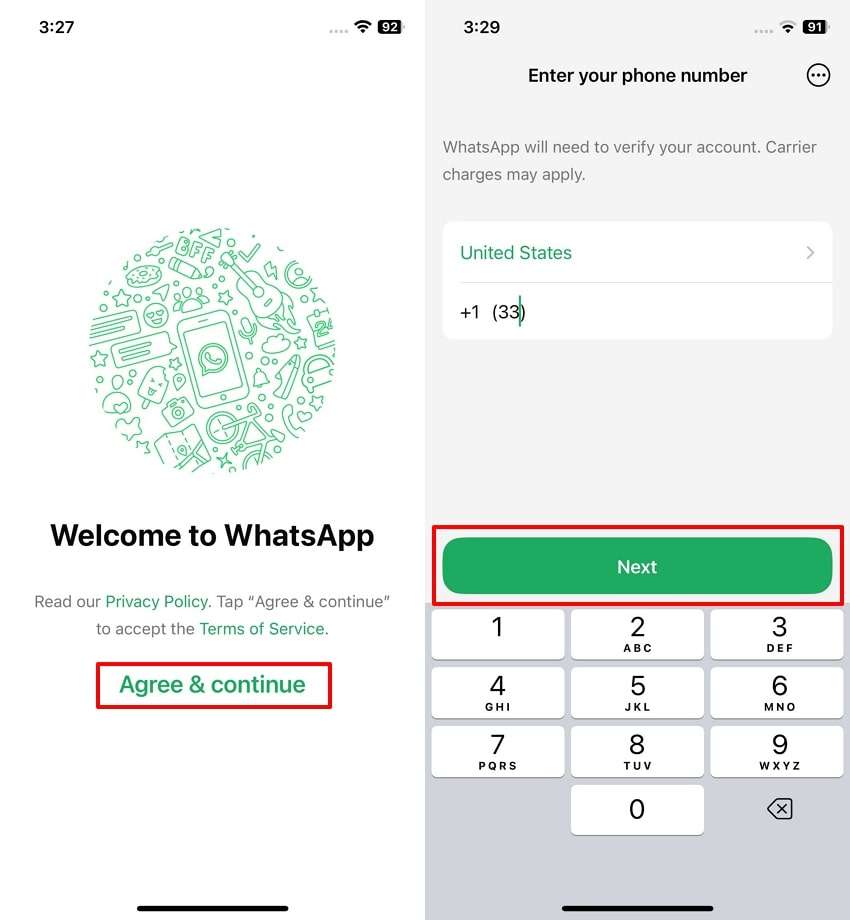
Select:
Log back in → Continue
Enter your phone number and request the six-digit registration code.
Enter the code received through SMS or phone call.
WhatsApp states that successfully re-registering the number logs other devices using the account out.
Step 3: What If the Attacker Enabled Two-Step Verification?
This is one of the most confusing situations for victims.
You may successfully receive the six-digit code but then encounter a two-step verification PIN/password that you do not know.
Do not keep guessing random PINs.
WhatsApp’s official recovery guidance states that if you don’t know the two-step verification PIN set by someone else, you may need to wait seven days before trying again.
Importantly, entering the six-digit SMS registration code still logs the other user out of the account.
Step 4: Check Linked Devices
Once you regain access:
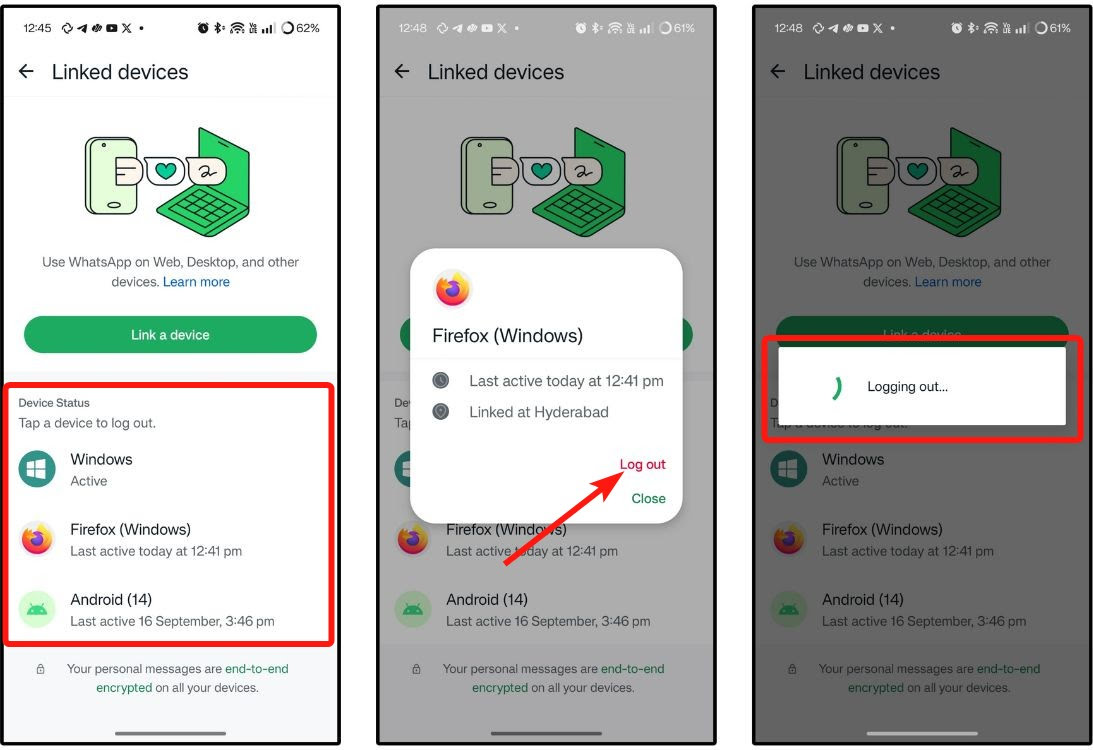
Open:
WhatsApp → Settings → Linked Devices
Review every connected device.
If you see anything unfamiliar:
Log out immediately.
WhatsApp recommends regularly checking linked devices and logging out of sessions you don’t recognize.
Step 5: Enable Two-Step Verification
After recovery, enable WhatsApp’s additional security protection.
Use a unique PIN/password and recovery email where available.
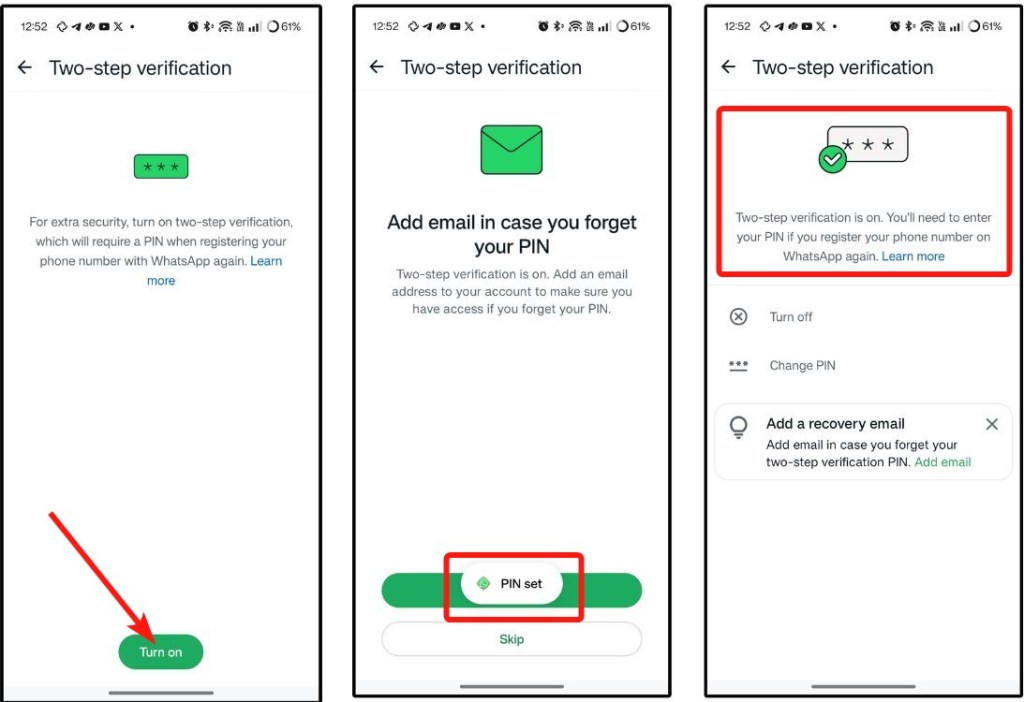
WhatsApp currently provides several security mechanisms including:
- Two-step verification
- Passkeys
- App lock
- Chat lock
- Encrypted backups
- Linked-device management
- Additional account security controls
Step 6: Warn Your Contacts
This step is often forgotten.
If your account was compromised, send a warning to important contacts through another channel.
For example:
“My WhatsApp account was temporarily compromised. Please ignore any recent requests for money, OTPs, links or files sent from my number.”
Why?
Because attackers may continue attempting fraud even after you recover the account.
WhatsApp itself recommends notifying friends and family when an account is compromised because attackers may impersonate the account owner.
Step 7: Secure Your Phone
If you believe malware was involved:
- Update Android/iOS
- Update WhatsApp
- Remove suspicious applications
- Review application permissions
- Review accessibility permissions
- Check notification access
- Run a reputable mobile security scan
- Change important account passwords
- Review Google/Apple account security
If a computer was involved:
- Disconnect it from the internet if appropriate
- Preserve evidence before wiping it
- Run a professional malware/EDR investigation
- Review browser sessions
- Review installed applications
- Change compromised credentials from a clean device
For business incidents, professional incident response may be appropriate.
What If I Can’t Recover My WhatsApp Account?
Start with the official WhatsApp recovery process.
WhatsApp specifically recommends attempting account recovery before reporting a compromised account because reporting can have consequences for account access.
If the problem continues:
- Confirm that your SIM works.
- Confirm that you can receive SMS/calls.
- Re-register using the official WhatsApp application.
- Follow the two-step verification recovery process if applicable.
- Use official WhatsApp support channels.
- Preserve screenshots and suspicious messages.
- Report the cybercrime if financial loss or criminal activity occurred.
How to Report WhatsApp Cybercrime in India
If you have suffered financial fraud or another cybercrime in India, report it as soon as possible.
The Government of India’s National Cyber Crime Reporting Portal provides reporting facilities for cybercrime, including suspicious WhatsApp numbers, phone numbers, websites, email IDs and social-media URLs.
National Cyber Crime Helpline: 1930
National Cyber Crime Reporting Portal: cybercrime.gov.in
If money has been transferred fraudulently, time matters. Contact your bank/payment provider and report the incident immediately in addition to filing the cybercrime complaint.
WhatsApp Scam Prevention Checklist
Use this simple checklist:
| Security Measure | Recommended |
|---|---|
| Never share WhatsApp OTP | ✅ |
| Enable two-step verification | ✅ |
| Add recovery email | ✅ |
| Review linked devices | ✅ |
| Don’t scan unknown WhatsApp QR codes | ✅ |
| Don’t install unknown APKs | ✅ |
| Don’t open suspicious ZIP/EXE files | ✅ |
| Verify urgent money requests | ✅ |
| Keep WhatsApp updated | ✅ |
| Keep phone OS updated | ✅ |
| Secure your SIM | ✅ |
| Check call-forwarding settings | ✅ |
| Warn contacts after compromise | ✅ |
| Report financial cybercrime immediately | ✅ |
10 Red Flags That a WhatsApp Message Is a Scam
Be extremely careful if someone:
- Asks for your OTP.
- Asks for your WhatsApp PIN.
- Sends an unexpected QR code.
- Asks you to link your WhatsApp to another device.
- Sends an APK.
- Sends an unexpected ZIP or executable.
- Demands immediate payment.
- Threatens account suspension.
- Promises unrealistic earnings.
- Claims to be WhatsApp support and contacts you unexpectedly.
Can Someone Hack WhatsApp Without the OTP?
Potentially, yes—but this depends on the attack method.
An attacker may attempt to abuse:
- Linked devices
- Malware
- Compromised computers
- SIM-related attacks
- Call forwarding
- Social engineering
- Stolen sessions
- Device compromise
Therefore, “I never shared my OTP, so my WhatsApp cannot be compromised” is not a complete security strategy.
WhatsApp itself provides multiple security layers beyond the registration code, including linked-device controls, passkeys, two-step verification and other account protections.
Common Call Forwarding Codes
Important: These are telecom supplementary-service/MMI codes, not WhatsApp commands. Availability and behavior can vary by operator and plan. Never dial a forwarding code supplied by an unknown caller. Verify the result with your telecom provider.
| Purpose | Common code |
|---|---|
| Activate unconditional call forwarding | *21*NUMBER# |
| Check unconditional forwarding | *#21# |
| Deactivate unconditional forwarding | ##21# |
| Check forwarding when busy | *#67# |
| Check forwarding when unanswered | *#61# |
| Check forwarding when unreachable | *#62# |
| Cancel all call forwarding | ##002# |
Vi documents these codes for its network, while Airtel documents *#21#, ##21#, and ##002# for relevant call-forwarding/diversion functions.
Does End-to-End Encryption Prevent WhatsApp Account Takeover?
End-to-end encryption protects the content of communications while they are transmitted between communicating devices.
But encryption does not protect you from every form of account or device compromise.
For example, if you unknowingly authorize a malicious linked device or compromise the computer running an active WhatsApp Web session, the attacker may interact with the account through an authorized or compromised endpoint.
This is why cybersecurity involves more than encryption.
It also requires:
Identity security + device security + authentication security + user awareness.
What Should You Never Do After Your WhatsApp Is Hacked?
Avoid these mistakes:
❌ Don’t pay a “WhatsApp recovery hacker”
There are many people online claiming:
“I can recover your WhatsApp in 10 minutes.”
This can become a second scam.
❌ Don’t share your OTP
Even when someone claims to be support.
❌ Don’t give remote access to your phone
Avoid unknown remote-access applications.
❌ Don’t keep interacting with the attacker
Collect evidence and follow official recovery procedures.
❌ Don’t delete all evidence immediately
Screenshots, phone numbers, messages, URLs and timestamps can be useful for investigation and reporting.
For Businesses: Why WhatsApp Account Takeover Is a Serious Cybersecurity Risk
For organizations, WhatsApp should be treated as part of the broader communication security environment.
A compromised employee account can become a gateway for:
- Business email compromise
- Social engineering
- Payment fraud
- Malware distribution
- Customer impersonation
- Vendor fraud
- Executive impersonation
- Credential theft
- Data leakage
The 2026 I4C “Boss Scam” advisory demonstrates how WhatsApp compromise can be connected to high-value financial fraud targeting corporate finance teams.
Organizations should therefore consider:
- Security awareness training
- MFA across corporate accounts
- Endpoint protection
- Mobile Device Management
- Email security
- Secure backups
- Incident response procedures
- Employee phishing simulations
- Payment verification policies
- Executive impersonation controls
The Biggest WhatsApp Security Myth
“Hackers can simply enter my WhatsApp remotely.”
In reality, many successful attacks require some form of user interaction, stolen authentication, device compromise or social engineering.
The attacker may not “break WhatsApp.”
They may instead manipulate the victim into:
- Giving them a verification code
- Linking a device
- Installing malware
- Activating call forwarding
- Giving remote access
- Revealing sensitive information
- Approving a fraudulent request
This is why cybersecurity awareness is one of the strongest defenses against account takeover.
How to Secure Your WhatsApp in 5 Minutes
If you are reading this article and your account is currently safe, take these steps now:
1. Enable two-step verification
Add an email for recovery where available.
2. Review Linked Devices
Remove anything you don’t recognize.
3. Enable available device security
Use a strong screen lock, biometric authentication and app-lock features where appropriate.
4. Never share verification codes
Make this a permanent rule.
5. Verify unexpected requests
If a friend suddenly asks for money or sends a suspicious link, contact them through another channel.
Frequently Asked Questions
Can I hack someone’s WhatsApp?
Attempting to access another person’s WhatsApp without authorization is unauthorized access and can be illegal. This article focuses on understanding common account-takeover techniques so users can protect themselves and recover compromised accounts.
How do I know if my WhatsApp is hacked?
Look for unexpected logouts, unfamiliar linked devices, messages you didn’t send, unexpected verification codes, suspicious activity from your account, or unusual SIM/call behavior.
Can WhatsApp be hacked through a QR code?
A QR code itself is not inherently malicious. However, attackers can socially engineer users into authorizing a linked device through a QR-code process. I4C has specifically warned about WhatsApp Web account-renting scams using QR codes.
Can call forwarding hack WhatsApp?
Call forwarding can potentially expose incoming verification calls to an attacker if a service uses voice-based verification. Indian telecom guidance specifically warns that scammers abuse call forwarding for this purpose.
What should I do if someone enabled two-step verification on my account?
Re-register your WhatsApp number using the six-digit SMS/phone verification code. If you don’t know the two-step verification PIN/password that was enabled by someone else, WhatsApp’s recovery process may require a seven-day waiting period.
Will registering WhatsApp again remove the hacker?
According to WhatsApp, successfully re-registering your phone number with the six-digit code automatically logs other devices out of the account.
Can I recover my old WhatsApp chats?
If you have an appropriate Google Account or iCloud backup, WhatsApp says you may be able to restore your chat history.
What is the WhatsApp 1930 helpline?
1930 is India’s National Cyber Crime Helpline. It can be used for reporting cybercrime and financial cyber fraud. You can also use the National Cyber Crime Reporting Portal.
Final Thoughts
The search term “how to hack WhatsApp” often makes people imagine sophisticated technical hacking.
But the biggest real-world threat is frequently much simpler:
A convincing message.
A fake emergency.
A malicious file.
A QR code.
A stolen verification code.
A compromised device.
Modern WhatsApp attacks increasingly combine social engineering, identity theft, malware and legitimate WhatsApp functionality rather than relying on a single technical vulnerability.
The safest approach is therefore not to search for a “WhatsApp hacker” when something goes wrong.
Instead:
Secure your phone number → Recover the account → Remove unknown devices → Enable additional security → Warn your contacts → Report the incident when necessary.
For organizations, the same principle applies at a larger scale: WhatsApp security should be treated as part of an organization’s overall identity, endpoint, awareness and incident-response strategy.
If your WhatsApp account has already been compromised, act quickly and use official recovery channels rather than trusting people who promise instant recovery.
About TriosCyber
TriosCyber is a cybersecurity-focused organization working across VAPT, security assessments, SOC/MDR, incident response, cybersecurity training, security awareness and enterprise security consulting.
If you believe your device, WhatsApp Web session or organization has been compromised, a professional cybersecurity assessment can help identify the broader cause of the incident rather than treating only the visible symptom.
Stay aware. Stay verified. Stay secure.
TriosCyber — Cybersecurity for a Safer Digital World.