
How to Detect an AI Deepfake: 10 Signs a Video, Voice or Image Is Fake
A video of a famous person asks you to invest money. Your “boss” sends a voice message asking for an urgent payment. A family member appears on a video call asking for help.
Everything looks and sounds real.
But what if it isn’t?
With generative AI becoming increasingly powerful, creating realistic fake videos, cloned voices and AI-generated images is easier than ever. Deepfakes are now being used for scams, impersonation, misinformation, identity fraud and social engineering.
Recent cybersecurity research shows that deepfake technology is becoming harder to distinguish from genuine media, making verification and digital awareness more important than simply looking for obvious visual glitches.
The good news is that you don’t need to be a cybersecurity expert to perform some basic checks.
In this guide, you’ll learn how to detect an AI deepfake, including 10 practical signs to look for in videos, voices and images.
What Is a Deepfake?
A deepfake is AI-generated or AI-manipulated media that makes a person appear to say or do something they never actually said or did.
Deepfakes can involve:
- 🎥 AI-generated or manipulated videos
- 🎙️ AI voice cloning
- 🖼️ AI-generated or manipulated images
- 👤 Face swapping
- 🗣️ AI-generated speech
- 📱 Fake video calls
- 📰 Fake celebrity or public-figure statements
The technology itself isn’t necessarily malicious. AI-generated media can be used for entertainment, education, filmmaking and creative applications.
The problem begins when synthetic media is created to deceive people.
For example, attackers can combine a person’s publicly available photos, videos and voice recordings to create convincing impersonation content.
Why Are Deepfakes Dangerous in 2026?
Deepfakes are no longer limited to obviously unrealistic videos.
AI can now generate convincing facial expressions, voices and movements, while attackers can combine them with social engineering to make scams appear authentic.
The risks include:
1. Financial scams
Attackers may impersonate executives, family members, celebrities or financial advisors to convince victims to transfer money.
2. Identity theft
AI-generated images and videos can potentially be used to impersonate individuals or support fraudulent identity claims.
3. Fake investment promotions
A fake video can make it appear that a celebrity or business leader is promoting an investment opportunity.
4. Social engineering
Deepfakes can make phishing and impersonation attacks much more believable.
5. Misinformation
Fake videos of politicians, executives or public figures can spread false information rapidly.
6. Reputation damage
Someone’s face or voice can be manipulated to make them appear to say or do something they never did.
Recent incidents in India have also demonstrated how convincing deepfake video and voice impersonation can be used in financial scams.
How to Detect an AI Deepfake: 10 Signs to Look For
Important: No single sign proves that a video, image or recording is fake.
Modern deepfakes can be extremely convincing, and some older clues—such as unnatural blinking—are becoming less reliable.
The safest approach is to combine visual inspection + audio analysis + source verification + independent confirmation. MIT’s Detect Fakes project similarly emphasizes that there is no single tell-tale indicator that works for every deepfake.
Here are 10 practical checks.
1. Check Where the Content Came From
Before examining someone’s face, examine the source.
Ask:
- Who originally posted it?
- Is the account verified or trustworthy?
- Is this the original upload?
- Are reputable sources reporting the same event?
- Does the person’s official account contain the same video?
- Is the website or social media account legitimate?
This is one of the most important deepfake detection techniques.
Imagine a video claiming:
“Famous CEO announces a guaranteed investment opportunity.”
Instead of immediately believing the video, search for the same announcement through:
- The company’s official website
- Verified social media accounts
- Reputable news organizations
- Official press releases
If the claim exists only on an unknown account, stop and investigate before sharing or acting on it.
Why this works
A sophisticated deepfake may fool your eyes, but it cannot automatically make the surrounding story legitimate.
Context matters.
2. Look Closely at the Face and Facial Edges
Zoom in on the person’s face.

Look around:
- Jawline
- Cheeks
- Hairline
- Ears
- Neck
- Face-to-body boundaries
Possible warning signs include:
- Flickering around the face
- Blurry facial edges
- Face texture changing between frames
- Unnatural transitions between face and neck
- Face appearing slightly detached from the body
- Features changing during head movement
These problems can become more visible when the person turns their head or when something temporarily passes in front of their face.
However, modern AI has improved significantly, so the absence of these glitches does not prove that a video is authentic.
3. Watch the Eyes, Blinking and Reflections
Eyes can provide useful clues.
Look for:
- Unnatural blinking
- Eyes that don’t move naturally
- Inconsistent reflections
- Pupils behaving strangely
- Different lighting between the two eyes
- Eye direction that doesn’t match the person’s head position
Also look at glasses.
Does the reflection in the glasses change naturally when the person moves?
MIT’s deepfake research specifically recommends examining areas such as the eyes, eyebrows, glasses, facial hair and blinking patterns for inconsistencies.
But remember:
An AI-generated video can still have realistic eyes.
So use this as one clue—not a final verdict.
4. Check Lip-Sync Carefully
One of the most useful checks for a suspicious video is to separate the voice from the face.
Watch the person’s mouth while listening to the audio.
Look for:
- Mouth movements that don’t match speech
- Slight delays between speech and lip movement
- Unnatural mouth shapes
- Teeth appearing or disappearing strangely
- Lips moving differently from the sounds being produced
Pay particular attention when the person says words involving sounds such as:
P, B, M, F and V.
These sounds require specific mouth movements.
If the voice says something but the lips don’t appear to produce the corresponding sound, that’s a potential warning sign.
5. Look for Lighting and Shadow Problems
AI-generated media sometimes struggles with the physics of light.
Check:
- Face lighting
- Shadows
- Reflections
- Glasses
- Skin highlights
- Background lighting
For example, imagine a person standing in a room where the light clearly comes from the left.
Their face should generally reflect that lighting.
If the background indicates one light direction while the face appears illuminated from another direction, the content deserves further investigation.
Look especially closely when the person moves.
Does the lighting remain physically consistent?
6. Examine Hair, Skin, Teeth and Small Details
AI-generated content can sometimes struggle with fine details.
Look closely at:
Hair
- Hair strands flickering
- Hair merging into the background
- Unnatural movement
Skin
- Extremely smooth skin
- Texture changing between frames
- Unnatural wrinkles
Teeth
- Teeth changing shape
- Unusual spacing
- Teeth becoming blurry during speech
Facial hair
- Beard or moustache changing shape
- Hair appearing/disappearing between frames
These aren’t guaranteed indicators of a deepfake, but multiple inconsistencies together can increase suspicion.
7. Check Hands, Text and the Background
Don’t focus only on the person’s face.
Look at everything around them.
Hands
AI-generated images and videos can sometimes produce:
- Incorrect fingers
- Unnatural finger positions
- Merged fingers
- Strange hand movements
Text
Look at:
- Signs
- Posters
- Screens
- Product labels
- Logos
- Captions
AI-generated text may appear distorted, inconsistent or change unexpectedly.
Background
Look for:
- Objects changing shape
- Walls bending
- Patterns moving
- Objects appearing/disappearing
- Unnatural perspective
The more complex the scene, the more opportunities there may be for subtle inconsistencies.
8. Listen to the Voice Separately
Deepfakes aren’t only visual.
AI voice cloning is becoming a major social-engineering risk.
A scammer may create an audio recording that sounds like:
- Your manager
- Your parent
- Your friend
- A customer
- A government official
- A celebrity
- A company executive
When listening to suspicious audio, pay attention to:
- Unnatural pauses
- Repetitive speech patterns
- Unusual pronunciation
- Strange breathing
- Robotic cadence
- Background noise that doesn’t fit the environment
- Sudden changes in audio quality
However, modern voice cloning can sound extremely convincing.
So don’t rely only on whether a voice “sounds real.”
The best defense is verification.
If someone calls asking for money or sensitive information, contact that person separately using a known phone number or trusted communication channel.
Don’t simply reply to the suspicious call or message.
9. Pay Attention to Urgency and Unusual Requests
This is one of the biggest clues—and it has nothing to do with AI quality.
Ask:
What is the person asking me to do?
Be suspicious if a supposedly trusted person suddenly asks you to:
- Transfer money
- Share an OTP
- Reveal a password
- Send confidential documents
- Purchase gift cards
- Share banking information
- Open an unknown link
- Install an application
- Keep the conversation secret
For example:
“I’m stuck somewhere. Don’t call me. Send ₹50,000 immediately.”
Even if the voice sounds exactly like someone you know, verify independently.
AI has made impersonation more convincing, but attackers still rely heavily on human emotions such as fear, urgency, trust and authority.
10. Check Metadata, Provenance and Digital Credentials
For more advanced verification, investigate the file itself.
Depending on the original file, you may be able to examine:
- Creation date
- Modification date
- File type
- Editing history
- Embedded metadata
- Content credentials
- Digital provenance information
Emerging standards such as C2PA Content Credentials are designed to provide information about the origin and history of digital content.
This is becoming increasingly important because visual inspection alone is becoming less reliable.
But there is an important limitation:
Missing metadata does not automatically mean the content is fake.
Social media platforms frequently compress, transform or strip metadata.
So metadata should be treated as supporting evidence, not a final answer.
How to Detect a Deepfake Image
If you’re checking an AI-generated or manipulated image, use this quick checklist:
Look for:
✅ Unnatural hands
✅ Strange fingers
✅ Distorted text
✅ Incorrect logos
✅ Unusual reflections
✅ Inconsistent shadows
✅ Strange teeth
✅ Asymmetrical facial features
✅ Unnatural hair
✅ Background objects that don’t make sense
Then perform a reverse image search.
If the image claims to show a recent event but an older version of the same image appears online, the context may be misleading.
For suspicious videos, use this workflow:
Step 1 – Watch normally
Don’t immediately search for glitches.
Ask:
Does the story make sense?
Step 2 – Slow the video down
Watch suspicious sections carefully.
Pay attention to:
- Face edges
- Eyes
- Mouth
- Hair
- Hands
- Background
Step 3 – Listen without watching
Close your eyes or mute the video first.
Does the audio sound natural?
Step 4 – Watch without audio
Now focus entirely on facial movement and body language.
Step 5 – Verify the source
Search for the original video and check trusted sources.
Step 6 – Use detection technology if necessary
AI detection tools can provide another signal, but don’t treat their result as absolute proof.
NIST’s current deepfake-forensics work highlights a major challenge: detector performance can degrade significantly when moving from controlled evaluation environments to real-world conditions.
Can AI Deepfake Detectors Always Detect Fake Content?
No.
This is extremely important.
You might upload an image or video to an AI detection tool and receive:
“85% likely AI-generated.”
That doesn’t necessarily mean the content is definitely fake.
Another detector might produce a completely different result.
Why?
Because AI-generated media is continuously improving.
Attackers also compress, crop, resize and modify content, while legitimate media can sometimes trigger false positives.
Therefore:
Don’t use this formula:
Detector says fake → case closed.
Instead use:
Source + Context + Visual Analysis + Audio Analysis + Provenance + Detection Tools
The more independent evidence you have, the stronger your conclusion.
The 30-Second Deepfake Detection Checklist
When you encounter suspicious content, ask these questions:
| Check | Question |
|---|---|
| 👤 Source | Who originally posted this? |
| 🌐 Context | Does the story make sense? |
| 👁️ Face | Are facial movements natural? |
| 👄 Lips | Does speech match lip movement? |
| 👀 Eyes | Do eyes and reflections look natural? |
| 💡 Lighting | Are shadows physically consistent? |
| 🖐️ Hands | Do fingers and movements look normal? |
| 🎙️ Voice | Does the audio sound natural? |
| 🚨 Request | Is someone demanding urgent action? |
| 🔎 Verification | Can I confirm it through another trusted source? |
If several answers look suspicious:
STOP → VERIFY → THEN ACT
What Should You Do If You Receive a Deepfake Scam?
If you believe someone is using a deepfake to scam you:
1. Don’t send money
Even if the person looks or sounds familiar.
2. Don’t share OTPs or passwords
No legitimate emergency should override basic security practices.
3. Verify through another channel
Call the person directly using a known number.
4. Save evidence
Keep:
- Screenshots
- Video
- Audio
- Phone numbers
- Usernames
- URLs
- Messages
- Transaction details
5. Report the account
Use the reporting mechanism of the platform where the content appeared.
6. Contact your bank immediately if money was transferred
Speed can matter significantly in financial fraud cases.
7. Report cybercrime where appropriate
For readers in India, suspicious cyber-fraud incidents can also be reported through the appropriate government cybercrime reporting channels.
Deepfake vs Real: What Should You Trust?
Here’s the most important lesson:
Don’t trust your eyes alone.
A common mistake is:
“It looks real, so it must be real.”
That’s no longer a safe assumption.
Instead:
Trust verified information, not just realistic media.
A video can be technically convincing and still represent something that never happened.
The Future of Deepfake Detection
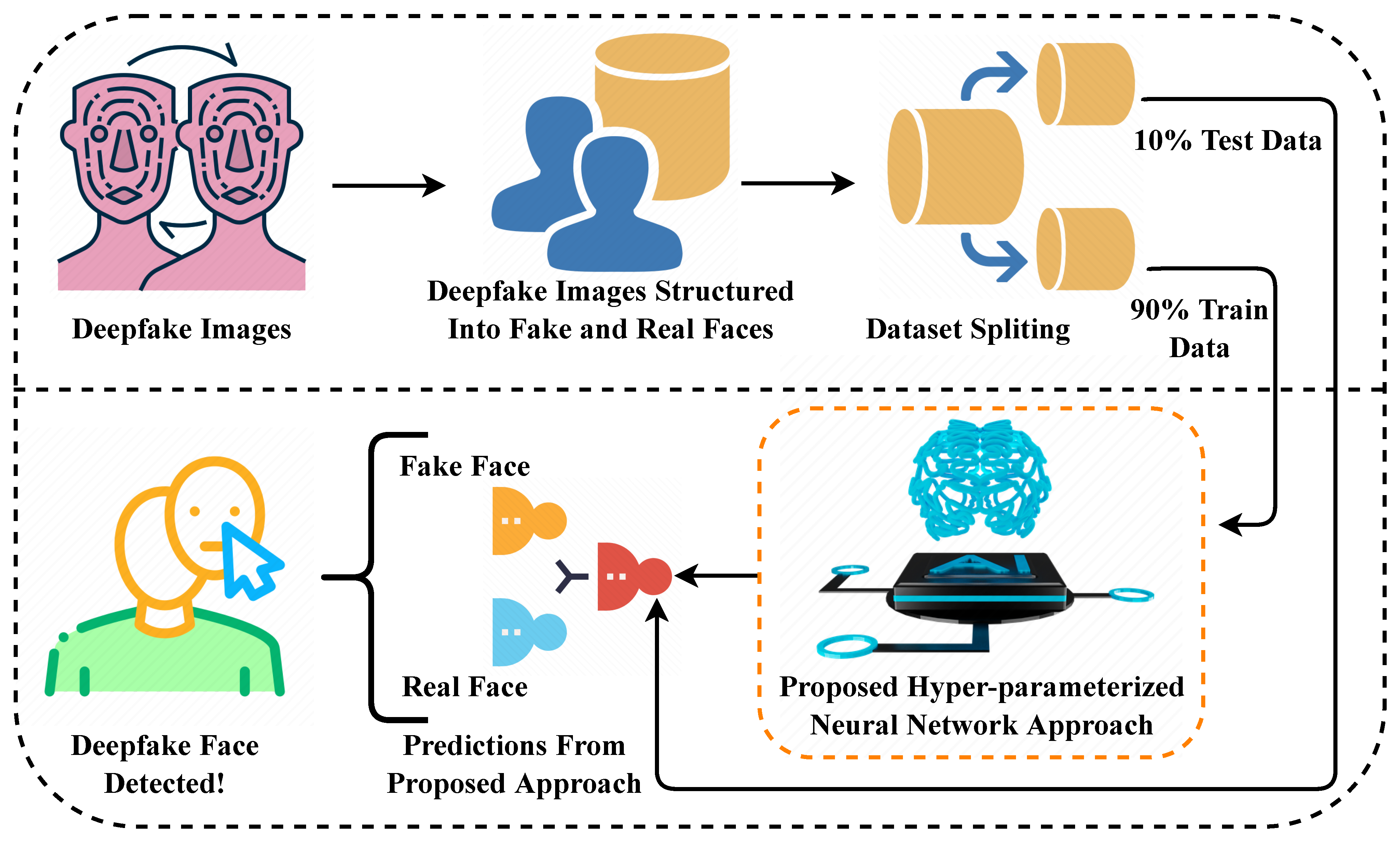
As generative AI improves, the traditional idea of “spot the fake” will become increasingly difficult.
The future of content verification will likely depend on multiple layers:
AI Detection
Machine-learning systems can analyze patterns that humans may miss.
Digital Provenance
Technologies such as C2PA can help establish where digital content came from and how it has been modified.
Platform Labels
Social platforms and content platforms can provide AI-generated-content indicators.
Human Verification
People still need to verify the source, context and purpose of suspicious content.
Cybersecurity Awareness
Perhaps most importantly, people need to understand how AI-powered social engineering works.
Deepfakes Are Becoming a Cybersecurity Problem
Deepfakes aren’t simply an “AI image problem.”
They are increasingly connected to cybersecurity and social engineering.
Consider this attack chain:
Public photo → AI-generated identity → Fake voice → Fake video → Social engineering → Financial fraud
The attacker doesn’t necessarily need to hack a computer.
They may simply hack human trust.
That is why cybersecurity awareness is becoming increasingly important for students, employees, businesses and organizations.
How Can You Prepare for AI-Powered Cyber Threats?
Learning cybersecurity today isn’t just about understanding viruses, firewalls or passwords.
Modern cybersecurity professionals need to understand:
- AI security
- Social engineering
- Phishing
- Identity attacks
- Digital forensics
- Threat intelligence
- Incident response
- OSINT
- Deepfake detection
- AI-generated attacks
- Security awareness
For students and beginners, the best approach is to combine knowledge with hands-on practice.
Instead of simply collecting certificates, focus on:
Learn → Practice → Build → Certify → Get Hired
Build Your Cybersecurity Skills With Ernith
This is where Ernith fits into the bigger cybersecurity learning journey.
Ernith is being developed as an AI-powered cybersecurity and career ecosystem designed around a simple idea:
Learn. Practice. Certify. Get Hired.
Instead of treating cybersecurity learning as only watching videos and collecting certificates, the goal is to make learning more practical, skill-focused and career-oriented.
You can explore cybersecurity concepts, develop practical knowledge and prepare yourself for the evolving cybersecurity job market.
Your cybersecurity journey shouldn’t end with a certificate.
It should begin with skills.
👉 Explore Ernith: ernith.com
How TriosCyber Can Help
For organizations, colleges and professionals looking for structured cybersecurity education or professional security services, TriosCyber focuses on cybersecurity training and enterprise security solutions.
Areas can include:
- Cybersecurity training
- Ethical hacking
- VAPT
- SOC training
- Security awareness
- AI security
- Cybersecurity audits
- Incident response
- GRC and compliance
- Professional cybersecurity services
👉 Explore TriosCyber: TriosCyber
Frequently Asked Questions About Deepfake Detection
What is a deepfake?
A deepfake is AI-generated or AI-manipulated media designed to make a person, voice or event appear authentic when it is not.
How can I tell if a video is a deepfake?
Check the source, facial movements, lip-sync, eyes, lighting, background, audio and overall context. Most importantly, independently verify important claims instead of relying on one visual clue.
Can AI-generated voices be detected?
Sometimes. Audio analysis can identify potential synthetic patterns, but modern voice cloning can be extremely convincing. Independent verification is still essential.
Can a deepfake look completely real?
Yes. High-quality deepfakes can be difficult for humans to identify, particularly after compression or when viewed casually. That’s why source verification and provenance are increasingly important.
Are all AI-generated images deepfakes?
No.
“Deepfake” generally refers to manipulated or synthetic media involving deception or impersonation. AI-generated content can also be created for legitimate purposes such as art, advertising, education and entertainment.
Can deepfake detection tools be trusted?
They can be useful, but they should not be treated as perfect. Detection systems can produce false positives and false negatives, and their performance can vary significantly depending on the media and real-world conditions.
What should I do if a family member sends me an urgent video or voice message asking for money?
Don’t rely on the voice or video alone. Contact the person separately using a trusted phone number or another communication channel and verify the request before sending anything.
Final Takeaway
Deepfakes are changing the way we need to think about digital trust.
The most dangerous deepfake isn’t necessarily the one with the worst visual quality.
It is the one that makes you trust a person, message or request without verifying it.
So the next time you see a shocking video, hear an unexpected voice message or receive an urgent request:
Stop.
Look.
Listen.
Verify.
Then act.
Because in the age of generative AI:
Seeing is no longer always believing.
And cybersecurity awareness may be your first line of defense.