

Introduction
Burp Suite is one of the most popular tools used in Cyber Security and Web Application Penetration Testing. It is developed by PortSwigger and helps security testers analyze, intercept and manipulate HTTP/HTTPS traffic between a browser and a web server.
Burp Suite is widely used by:
- Ethical Hackers
- Penetration Testers
- Bug Bounty Hunters
- Security Researchers
- Cyber Security Students
It helps identify vulnerabilities such as:
- SQL Injection (SQLi)
- Cross-Site Scripting (XSS)
- CSRF
- IDOR
- Authentication flaws
- Session vulnerabilities
Editions of Burp Suite
1.Community Edition
Free version suitable for beginners and learning purposes.
Features
- Proxy
- Repeater
- Decoder
- Comparer
- Limited Intruder
2.Professional Edition
Paid version with advanced testing features.
Features
- Automated vulnerability scanner
- Advanced Intruder
- Extensions support
- Faster attack processing
3. Enterprise Edition
Designed for organizations and large-scale automated scanning.
Working of Burp Suite
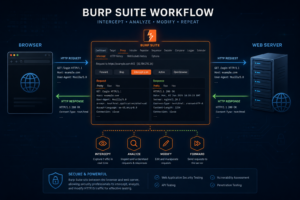
Burp Suite works as a proxy between the browser and the target website.
Browser ⇄ Burp Suite ⇄ Web Server
This allows the tester to:
- Capture requests
- Modify responses
- Test payloads
- Analyze traffic
Main Tabs / Tools in Burp Suite
1.Dashboard
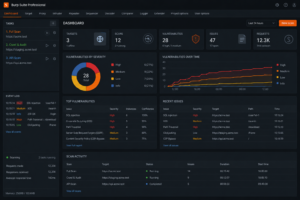
The Dashboard provides an overview of:
- Scan results
- Issues found
- Tasks running
- Activity logs
It acts as the main monitoring panel.
2.Target
The Target tab helps in:
- Mapping the website structure
- Viewing directories and files
- Understanding application flow
Important Sections
- Site Map
- Scope
- Issue Activity
3. Proxy
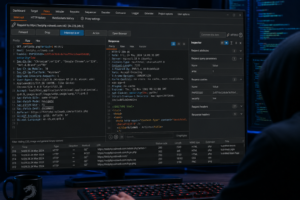
The Proxy tab is the core feature of Burp Suite.
Functions
- Intercept HTTP/HTTPS requests
- Modify requests before sending
- Analyze headers and cookies
Example
A login request can be captured and edited before reaching the server.
4. Intruder
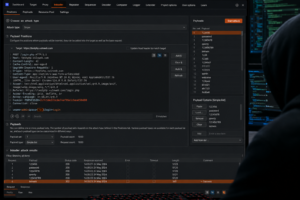
Intruder is used for automated attacks and fuzzing.
Uses
- Brute force attacks
- Payload testing
- Parameter fuzzing
Attack Types
- Sniper
- Battering Ram
- Pitchfork
- Cluster Bomb
5. Reapeter
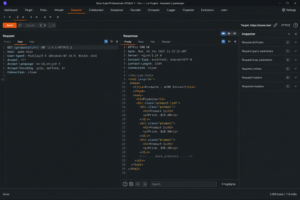
Repeater allows manual testing of requests repeatedly.
Uses
- SQL Injection testing
- XSS testing
- API testing
Example Payload
‘ OR 1=1 —
6. Sequencer
Sequencer analyzes randomness in session tokens.
Purpose
Checks whether session IDs are predictable or secure.
7.Decoder
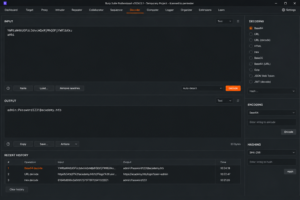
Decoder is used to encode and decode data.
Supported Formats
- Base64
- URL Encoding
- Hex
- HTML Encoding
Example
SGVsbG8=
Decoded Result: Hello
8. Comparer
Comparer helps compare:
- Requests
- Responses
- Tokens
- Data differences
Useful for analyzing changes in application behavior.
9. Extensions
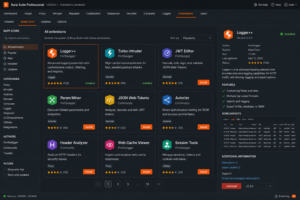
Extender allows users to install extensions and plugins.
Popular Extensions
- Logger++
- Turbo Intruder
- Autorize
- JWT Editor
Extensions increase Burp Suite functionality.
10. Scanner (Professional)
Automatically scans websites for vulnerabilities.
Detects
- SQL Injection
- XSS
- CSRF
- SSRF
- Directory Traversal
11. Collaborator
Collaborator is a feature used to detect hidden vulnerabilities that do not return direct responses in the browser.
It mainly helps identify:
- Blind SSRF
- Blind XXE
- Blind Command Injection
Other Out-of-Band vulnerabilities
12. Organizer
Helps manage:
- Notes
- Findings
- Testing workflow
Useful during large penetration tests.
Setting Up Burp Suite
Step 1: Install Burp Suite
Download from:
Step 2: Configure Browser Proxy
Default Proxy Settings:
IP: 127.0.0.1
Port: 8080
Step 3: Install Burp Certificate
For HTTPS interception:
- Open:
http://burp
- Download CA Certificate
- Install it in the browser
Common Vulnerabilities Tested
SQL Injection (SQLi)
Allows attackers to manipulate databases.
Example
admin’ —
Cross-Site Scripting (XSS)
Injecting malicious JavaScript into web pages.
Example
<script>alert(1)</script>
CSRF
Forcing users to perform unwanted actions.
IDOR
Accessing unauthorized resources by changing IDs.
Example
/user/101
Changed to:
/user/102
Advantages of Burp Suite
- User-friendly interface
- Powerful web testing tool
- Supports extensions
- Industry standard tool
- Excellent for manual testing
Limitations
- Professional version is paid
- Requires practice and knowledge
- Can generate false positives
- Advanced features may be complex for beginners
Applications of Burp Suite
Burp Suite is used in:
- Web Application Testing
- Bug Bounty Hunting
- API Security Testing
- Security Audits
- Ethical Hacking Labs
- Cyber Security Training
Conclusion

Burp Suite is an essential tool for anyone learning Web Application Security and Ethical Hacking. Its powerful tabs like Proxy, Repeater, Intruder, Decoder and Scanner make it highly effective for identifying vulnerabilities in modern web applications.
Learning Burp Suite helps cybersecurity professionals perform better penetration testing and improve application security.